AI Crawlers: What They Are and How to Control Them
AI crawlers are the bots that read the web to train and power AI tools. If ChatGPT can talk about your industry or Google’s AI can summarize your page, an AI crawler had a hand in it.
They have put a new question on every site owner’s desk: do I let them in, keep them out, or something in between? Here is what AI crawlers are and how to control them.
Key takeaways
- AI crawlers are bots from AI companies that collect web content to train models and answer questions, separate from the normal search crawlers.
- The main ones include OpenAI’s GPTBot, Google-Extended, Anthropic’s ClaudeBot, PerplexityBot, and Common Crawl’s CCBot.
- You control them mostly through robots.txt, allowing or blocking each by name.
- There is a real tradeoff: blocking them protects your content but can also remove you from AI answers that send awareness and traffic.
- For most businesses that want to be found in AI, the move is to allow the ones that cite sources and weigh the rest case by case.
What are AI crawlers?
AI crawlers are automated bots that AI companies use to gather web content. Some collect text to train models. Others fetch pages in real time to answer a question a user just asked. Both are different from the classic search crawler that indexes you for a results page.
When an AI tool mentions your product or quotes your page, a crawler is how your content got there. So how you treat these bots shapes whether you appear in AI answers at all.
The main AI crawlers to know
You do not need to track all of them, but a handful matter:
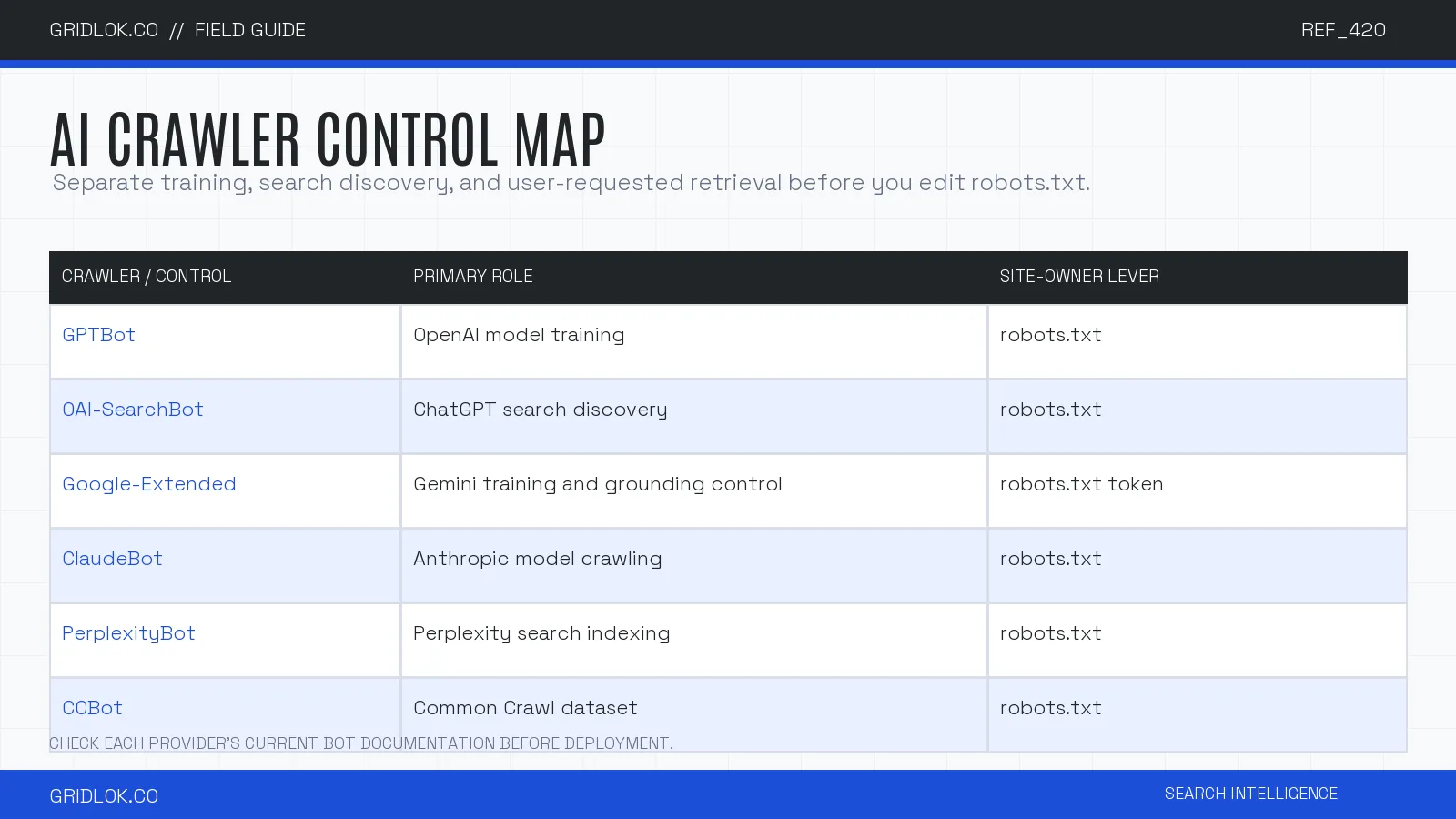
- GPTBot: OpenAI’s crawler for model training. OAI-SearchBot is the separate control for ChatGPT search discovery.
- Google-Extended: Google’s control for whether your content trains its AI, separate from normal Googlebot indexing.
- ClaudeBot: Anthropic’s crawler for Claude.
- PerplexityBot: Perplexity’s crawler, which powers its cited answers.
- CCBot: Common Crawl, an open dataset many AI models train on.
How to control AI crawlers
The main lever is robots.txt, the file that tells bots what they may access. You allow or block each crawler by its user-agent name.
Block a crawler, and you ask it to stay out. Allow it, and you let it read the pages you choose. You can also allow a bot on some sections and block it on others, the same way you would manage any crawler.
Two cautions. Robots.txt is a request, and reputable crawlers honor it, but it is not a hard wall. And blocking a training crawler is not the same as blocking a real-time answer bot, since the controls and the consequences differ.
| Crawler or token | Primary role | Control | Official documentation |
|---|---|---|---|
| GPTBot | OpenAI model training | robots.txt | OpenAI bots |
| OAI-SearchBot | ChatGPT search discovery | robots.txt | OpenAI bots |
| Google-Extended | Gemini training and grounding control | robots.txt token | Google crawlers |
| ClaudeBot | Anthropic model crawling | robots.txt | Anthropic support |
| PerplexityBot | Perplexity search indexing | robots.txt | Perplexity crawlers |
| CCBot | Common Crawl dataset | robots.txt | Common Crawl |
Bot names and roles change. Check the linked provider documentation before deploying a robots.txt policy.
Should you block or allow them?
This is the real decision, and the right answer changes with what you are protecting and what you want.
Allowing AI crawlers can put you in AI answers, which is awareness and, increasingly, traffic from cited sources. Blocking them protects your content from training and reduces server load, but it can also make you invisible in the tools your customers are starting to use.
For most businesses that want to be found, the practical middle is to allow the crawlers that cite their sources, like the ones behind Perplexity and AI answers, while deciding more carefully about pure training crawlers. A publisher protecting premium content will choose differently from a local business that wants every bit of visibility.
Where this fits
Controlling AI crawlers is the access layer of AI readiness, the gate before anything else. If the crawler cannot get in, the rest does not matter. For the full picture, see AI readiness: is your business ready for AI agents.
FAQ
AI crawlers are the front door of AI readiness. Decide who you let in on purpose, rather than leaving it to chance or a default you never set.
Once you have decided who can read you, check what they can actually do with your pages. The Agentic Readiness Check shows you.
See what ChatGPT is really searching
SubSeed captures the hidden Google queries ChatGPT runs behind every answer and enriches them with search volume, CPC, and keyword difficulty.
Related Posts

Read this post with an assistant
This is the whole prompt each button sends. Nothing hidden in it.
Read https://gridlok.co/blog/ai-crawlers/ and give me the main points in a few sentences.
Make Gridlok a Preferred Source on Google
See Gridlok surfaced more often in your Top Stories, AI Overviews, and AI Mode. One click, applied across Google Search.