Game Website SEO Basics: Slugs, Titles, and Meta Tags
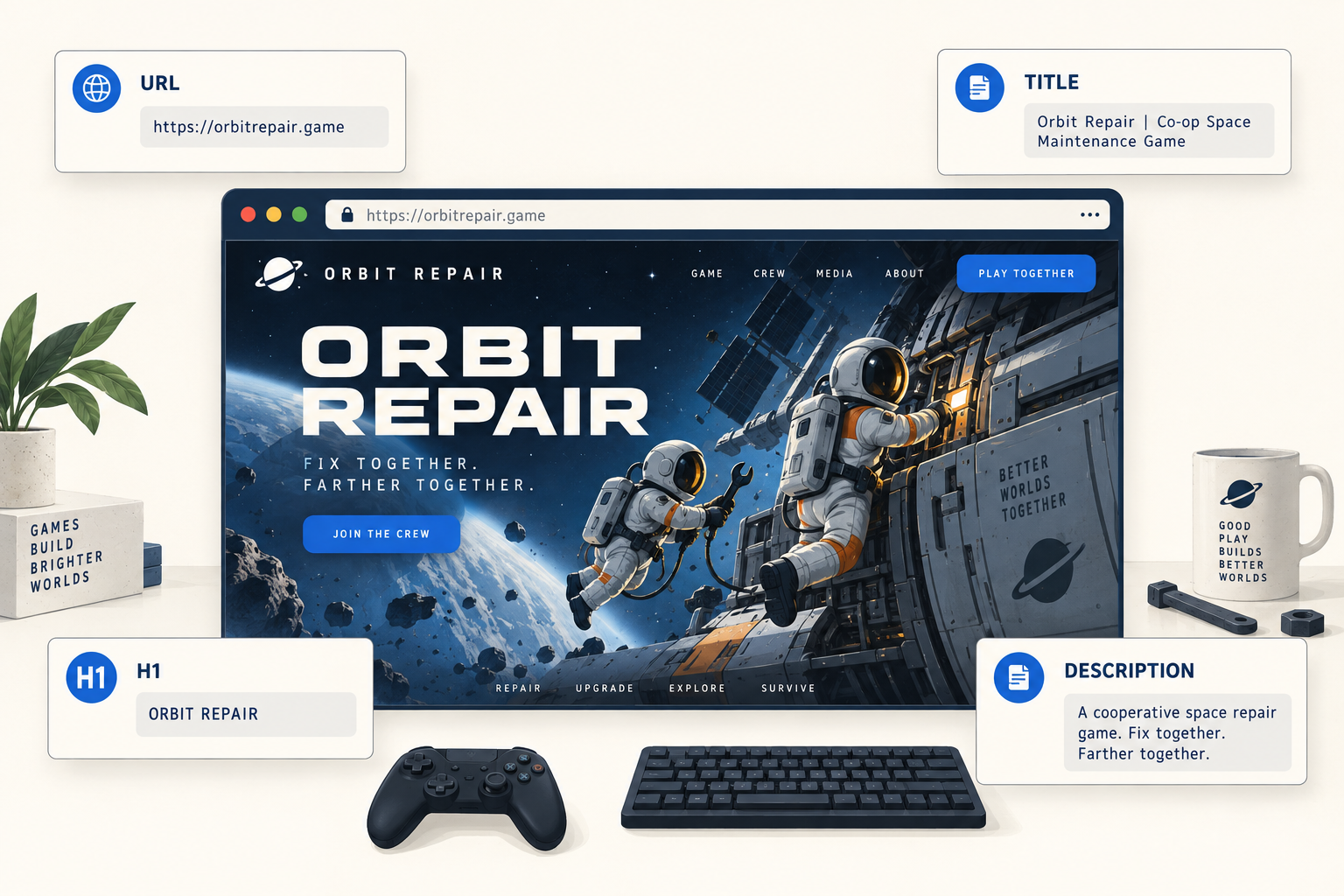
Game website SEO basics start with a descriptive URL, a clear page title, and an H1 that names the game or question the page covers. Add a useful meta description, readable game details, and links that help players reach the right page or store.
For a PC or console game, that means stating which platforms it supports, how multiplayer works, and what players can do next. Put those facts in page text so someone can find the answer without watching a trailer.
Key takeaways
- Use the game name or page topic naturally in the slug, title tag, and main heading.
- Give each page its own title and description. A game overview, demo page, and support answer serve different searches.
- Write platform and feature claims from confirmed product information. Keep them current as builds and release plans change.
- Use the worked example to prepare your fields. Check them with the page inspector and copy a CMS fix brief.
How do you choose keywords for a game page?
Start with the game name and the question the page answers. Someone searching for your game’s demo should land on a page with demo availability, supported platforms, and a working download or store link.
Check search results and your Search Console queries for the wording players use. “Local co-op,” “split-screen,” and “cross-play” describe different features. Only use a term when it accurately describes the game.
The game developer SEO query map helps assign those questions to pages. Broad genre searches may need comparisons or collections; a single game page should stay focused on that game.
What does a completed game page look like?
Orbit Repair is a fictional example. For this exercise, assume it is a two-player online co-op game announced for PC and PS5, with a demo available on PC. These details demonstrate the fields a studio would fill in.
| Field | Example | Where it appears |
|---|---|---|
| URL path | /games/orbit-repair/ | Browser address and links to the page |
| Title tag | Orbit Repair | Online Co-op Game for PC and PS5 | Browser tab; a source Google can use for its result title |
| H1 | Orbit Repair: Two-Player Space Repair | The main heading players see on the page |
| Meta description | Repair a damaged spacecraft together in Orbit Repair, a two-player online co-op game coming to PC and PS5. See the trailer and try the PC demo. | A possible source for the search result snippet |
| Opening paragraph | Orbit Repair is a two-player online co-op game about fixing a spacecraft under pressure. It is coming to PC and PS5. The PC demo is available now. | Readable text beneath the heading |
| Section headings | How does online co-op work? / Which platforms are confirmed? / Try the PC demo | H2 sections within the page |
| Screenshot alt text | Two players repair a reactor while a timer counts down. | The image’s text alternative |
| Internal link | Orbit Repair PC demo requirements | A link to a dedicated requirements page |
Link to this field map. Replace the fictional details with confirmed information from your own game.
Need help filling in these fields for your game? Talk to Jim about your page title, H1, and meta description.
Should the keyword go in the URL slug?
Use a short, descriptive slug containing the game name or page topic. The slug is the readable part of the URL that identifies the page, such as orbit-repair in /games/orbit-repair/.
A demo page could use /games/orbit-repair/demo/. Skip strings such as /best-pc-ps5-coop-space-game-demo-download/. They are harder to read and lock several changing claims into the address.
Google recommends descriptive URLs and hyphens between words. Choose a consistent format when creating pages. If you change an established URL, plan a permanent redirect and update internal links.
What is the difference between the title tag and H1?
The title tag names the page in the browser tab. The H1 is the main heading in the page itself. Your CMS may fill both from the post title, so inspect the rendered page before assuming they are separate fields.
Include the game name or primary topic in both. The title can add useful search context, such as platform or page type, while the H1 can use the wording that reads best above the content.
Use one clear H1 as your editorial convention. Give major sections H2s and place H3 subsections beneath them. Select heading levels for structure; use styling controls to change their size.
What should go in the meta description?
Write a short summary of the specific page and a relevant next step. For a demo page, mention the demo, its platform, and where to get it. For a support page, summarize the problem it solves.
Use the game name and relevant search wording naturally. Keep release status precise: “coming to PS5” and “available on PS5” make different promises.
Google may use your description or choose text from the page to match a search. Its snippet guidance sets no fixed description length; snippets are shortened to fit the device. Use a preview to check readability, without treating a character count as a ranking requirement.
| Field | What to do |
|---|---|
| SEO title | Check that the field actually controls the rendered HTML title. |
| Focus keyword | Use it for your plugin’s editorial checks. Saving a phrase here does not submit a ranking target to Google. |
| Meta keywords | Leave this out of your Google SEO workflow. Google ignores this tag. |
| Social title, description, and image | Preview the shared link. Keep the platform and release claims consistent with the page. |
Google’s supported meta tags documentation explains which tags it reads, including the description and robots directives.
How should headings, images, and links support the page?
Group related player questions into short sections. A multiplayer section can state player count, online or local play, and any confirmed cross-play limits. Keep the answer in text beside the relevant screenshot or trailer.
Describe informative screenshots in alt text. In the example above, the text explains the action shown. A purely decorative image can use an empty alt attribute. Follow Google’s image guidance for descriptive filenames, relevant surrounding text, and accessible image descriptions.
Link the game overview to its demo, requirements, support, and press pages where those links help. Use labels such as “PC demo requirements” so readers know what they will open. Google’s link guidance recommends crawlable links and descriptive anchor text.
If your CMS cannot edit these fields, add them to the game website development scope. The game studio website planning guide covers how these pages fit into the wider site.
Inspect your game page’s SEO fields
Enter a public page URL to see its current title, headings, description and indexing instructions. The review identifies fields to change and questions to check, then lets you prepare replacement CMS fields and markup.
Game page HTML inspector
Review a public URL or paste page HTML. Paste mode keeps the supplied HTML in this browser.
The results describe the initial HTML response or the HTML you paste. Compare JavaScript-rendered content in the browser and use Search Console for Google indexing checks.
Changes and reviews
Current HTML fields
Head fields
Body heading
Keep the title, description and canonical in the page head, and place the H1 in the visible page body. Update existing fields rather than adding a second set.
Share the inspector with your team. Share links open this tool without the page URL, pasted HTML or proposed edits.
Need help with your game page’s titles, headings, or meta descriptions?
Send Jim your game-page URL and the CMS you use. We can discuss what needs updating and whether you need help with the copy, site templates, or both.
Contact Jim about your game pageFrequently asked questions
About the examples
Gridlok created the fictional game example, field map, and page inspector for this guide. Technical guidance was checked against the linked Google Search Central documentation on September 22, 2026. The examples demonstrate page setup and make no traffic or ranking forecast.
See what ChatGPT is really searching
SubSeed captures the hidden Google queries ChatGPT runs behind every answer and enriches them with search volume, CPC, and keyword difficulty.
Related Posts

Read this post with an assistant
This is the whole prompt each button sends. Nothing hidden in it.
Read https://gridlok.co/blog/game-website-seo-basics/ and give me the main points in a few sentences.
Make Gridlok a Preferred Source on Google
See Gridlok surfaced more often in your Top Stories, AI Overviews, and AI Mode. One click, applied across Google Search.