SEO for Game Developers: Query Maps and a Steam Wishlist Calculator

SEO for game developers should answer the questions players ask before choosing a game, then measure what happens on the route to the store. Start with the game pages and keep website clicks separate from Steam wishlists.
To calculate a Steam wishlist rate, divide attributed wishlists by visits. State whether you used total visits or tracked visits, since those counts can differ within the same campaign.
Key takeaways
- Valve’s illustrative example has 20 total visits, 6 tracked visits, and 2 wishlists. Those figures produce rates of 10% and 33.3%, depending on the denominator. Source.
- The Steam wishlist conversion calculator calculates wishlists per total visit and per tracked visit.
- Map each player question to the page that can answer it. Use the query map below to assign release-date, co-op, and demo questions to specific pages.
- Report visits from search, store-button clicks, and Steam-attributed wishlists as separate counts.
Which questions should SEO for game developers target?
Prioritize questions your team can answer accurately and the game can actually satisfy. Separate searches for the title, searches for a type of experience, and inquiries about development services.
| Illustrative query | Best starting page | Useful next action | Fact to verify |
|---|---|---|---|
| [Game] release date | Main game page | Correct store listing | Platform-specific release state |
| Does [Game] have couch co-op? | Game feature section or support answer | Assess fit, then visit the store | Local play and player count |
| Does demo progress carry over? | Demo information page | Try the demo with clear expectations | Transfer rules for the current build |
| Short-session co-op games | A useful comparison or catalog collection | Compare relevant games | Session length and multiplayer requirements |
| [Studio] porting services | Studio service page | Qualified business inquiry | Platforms, relevant work, and availability |
| Publisher accepting [genre] submissions | Publishing requirements | A suitable pitch | Submission criteria and contact route |
Check these query ideas against actual search results and your Search Console data before choosing which pages to write. Search demand for them has not been measured here.
Use one strong page for closely related product questions. Split off a support answer when the platform rules or troubleshooting steps need more space than the game page can reasonably carry.
Need help deciding which player questions deserve a page? Ask Jim about a search plan for your game.
What should be checked before publishing more content?
Check that search engines can reach and read each game page. Fix accidental crawl blocks and add direct links from your catalog to the individual game pages.
| Check | What to inspect | Decision |
|---|---|---|
| Successful response | The intended URL returns a working page | Fix server errors and broken destinations |
| Crawler access | Robots rules and infrastructure access | Remove accidental blocks from pages intended for search |
| Readable information | Game facts exist as indexable text | Move important facts out of image-only artwork |
| Duplicate destinations | Canonical and internal-link choices | Choose a consistent primary URL |
Google’s technical requirements cover crawl access, a successful response, and indexable content. Meeting them makes a page eligible; it does not guarantee indexing.
Use Google’s canonical guidance when duplicate URLs need consolidation. If the CMS prevents the fix, put the change into the web development scope.
Are the game page’s basic SEO fields complete?
Give each priority page a descriptive slug, a unique title tag and meta description, and one clear game-name or topic H1. Organize supporting answers under H2s. Add descriptive internal links and useful screenshot alt text.
Inspect the HTML your theme produces, then compare it with the game website SEO basics guide. An installed SEO plugin does not confirm that the theme uses its fields correctly.
Which Steam wishlist conversion rate should you report?
Label each rate with the visit count used in the calculation. Steam reports total, trusted, and tracked visits separately. Its UTM conversion reporting connects eligible tracked visits to later actions such as wishlisting.
Steam wishlist conversion calculator
Enter values from the same UTM report row and date range. Defaults use Valve’s illustrative total, tracked, and wishlist values.
Example: 2 wishlists ÷ 20 total visits = 10%; 2 ÷ 6 tracked visits = 33.33%. Enter matching report figures to calculate your own rates.
Link to this tool · Runs in this page. Inputs are not submitted or saved by this tool.
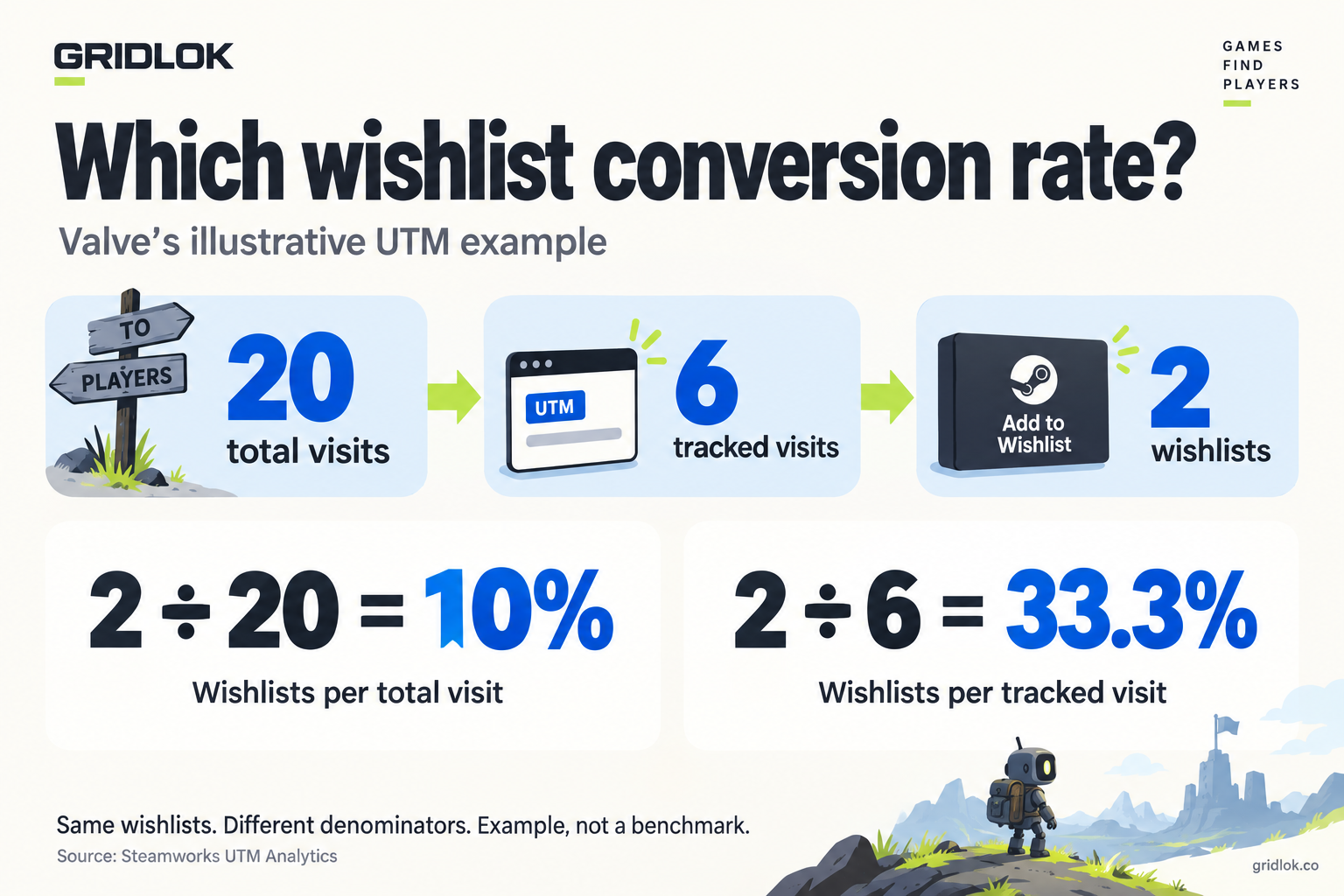
One example, two denominators
Scale: 0–100%. Both bars use the same two example wishlists from Valve’s documentation.
| Measure | Denominator or scope | What it cannot establish |
|---|---|---|
| Organic website visits | Your website analytics definition and date range | That the visitor later wishlisted |
| Store-button clicks | Recorded website link events | Completed Steam purchases or wishlists |
| Wishlists per total UTM visit | Attributed wishlists ÷ total tagged visits | A conversion rate for every person exposed to the campaign |
| Wishlists per tracked visit | Attributed wishlists ÷ tracked visits | The behavior of visitors outside tracked reporting |
Valve uses a 72-hour conversion window for the actions described in its UTM report. Privacy choices and login conditions affect coverage; use the current Steamworks definitions when interpreting a discrepancy.
Do not multiply unattributed visits by the tracked conversion rate and call the result confirmed wishlists. That would be an assumption about people whose outcomes you did not observe.
How can a studio test website SEO without overstating the result?
Pick a small set of pages, record the changes, and choose the decision the review should support. Keep launch events beside the numbers so a trailer announcement does not get credited entirely to a title-tag edit.
| Before changes | During the test | At review |
|---|---|---|
| Choose pages and relevant query groups | Record content and technical changes | Compare the same page and query groups |
| Record acquisition and store-click definitions | Keep campaign tags consistent | Report clicks and attributed conversions separately |
| Note releases, sales, and creator coverage | Add new events to the timeline | Explain competing reasons for a change |
| Choose a review date and business decision | Avoid changing the goal mid-test | Say when the sample cannot support a conclusion |
The game studio website guide connects this work to the launch plan. The AEO audit guide uses the same verified product facts when checking AI answers.
Sources, calculations, and limits
Gridlok created the query map and test log for planning game-site SEO work. The calculator uses user-entered counts and simple division; it does not connect to Steamworks or validate a campaign’s attribution.
The 20 total visits, 6 tracked visits, and 2 wishlists come from Valve’s documentation example, checked September 22, 2026. None of these values is a market benchmark.
For a field-by-field example, use the game website SEO basics guide to write the slug, title, H1, and meta description for a game page.
Need help choosing which player searches to target?
Send Jim your game-page URL, target platforms, and any Search Console data you can share. We can discuss which pages to improve and how to track search visits, store clicks, and attributed wishlists.
Discuss game-site SEO with JimFrequently asked questions
Sources
See what ChatGPT is really searching
SubSeed captures the hidden Google queries ChatGPT runs behind every answer and enriches them with search volume, CPC, and keyword difficulty.
Related Posts


Read this post with an assistant
This is the whole prompt each button sends. Nothing hidden in it.
Read https://gridlok.co/blog/seo-for-game-developers/ and give me the main points in a few sentences.
Make Gridlok a Preferred Source on Google
See Gridlok surfaced more often in your Top Stories, AI Overviews, and AI Mode. One click, applied across Google Search.