Crawled Currently Not Indexed: What Google Says It Actually Means
“Crawled – currently not indexed” has caused more unnecessary panic than any other line in Google Search Console. This week, Google’s own search relations team spent a full podcast episode explaining what that status, and the rest of the Page Indexing report, is really telling you. The short version: it asks less of you than most of us assume.
The episode landed at a good time for me. Days earlier, I ran a site: search on a domain I own, saw zero results, and wrote the whole thing off as deindexed. Then I opened Search Console for that property: 160 impressions over the previous three months, average position 7.9. The quick check I trusted gave me the wrong answer, and the report I skipped had the right one. Keep that mistake in mind, because the entire episode is about versions of it.
The source is Search Off the Record episode 112, with Martin Splitt and John Mueller. Everything below comes from that conversation, plus my own Search Console scar tissue, with the part that matters for AI search at the end.
Key takeaways
- The Page Indexing report works best as a change detector. The Search Console team wishes people would stop reading it as a list of things to fix.
- Expected 404s are correct behavior, and there is no target ratio of indexed to non-indexed pages. Google’s own developer docs sit around 5 percent indexed.
- “Crawled – currently not indexed” sometimes signals a quality judgment, and there is no technical fix for that kind.
- The nastiest trap is a CDN or bot-protection layer serving challenge pages with a 200 status. It can hand your canonicals to a stranger’s error page.
A change detector, not a to-do list
The report exists to show you patterns, not to assign homework. Splitt shared advice from Hillel on the Search Console team, who wishes people would stop treating the report as a list of things to fix or a static inventory to monitor. The better question is whether the site is doing what you expect it to do in the index.
That framing changes how every row reads. If you migrated URLs and set up redirects, a steep rise in “page with redirect” is not a problem to solve. It is confirmation that Google processed your change. If you deleted a whole category and the 404 count did not rise, that silence is the actual warning, because the thing you did has not landed yet.
Data delays are part of this too. New sections can take hours or days to show up in the report, so a fresh publish with no indexing data is usually a clock problem, not a site problem.
When a 404 is the right answer
Pages you removed are supposed to return 404. Search Console labels them as errors because they are errors, in the technical sense. They are just expected ones. The report cannot judge your intent, so you have to.
Mueller described the version of this that anyone doing client work will recognize: a manager who wants Search Console green across the board, and a report with an error number that will not go down. If you have ever had to defend a rising 404 count after a cleanup, this episode is your receipts. Deleting thin pages produces 404s. That is the system working.
Same logic for the occasional blip. A handful of failed requests or DNS lookups, a brief burst of 500s during a host migration: Google retries and moves on. Per Mueller, an error that lives for less than a day is generally looked over. Past a day, their systems start reacting. So a flat, noisy error line is the internet being the internet. A new line climbing steeply is the thing worth your afternoon.
What “crawled – currently not indexed” really means
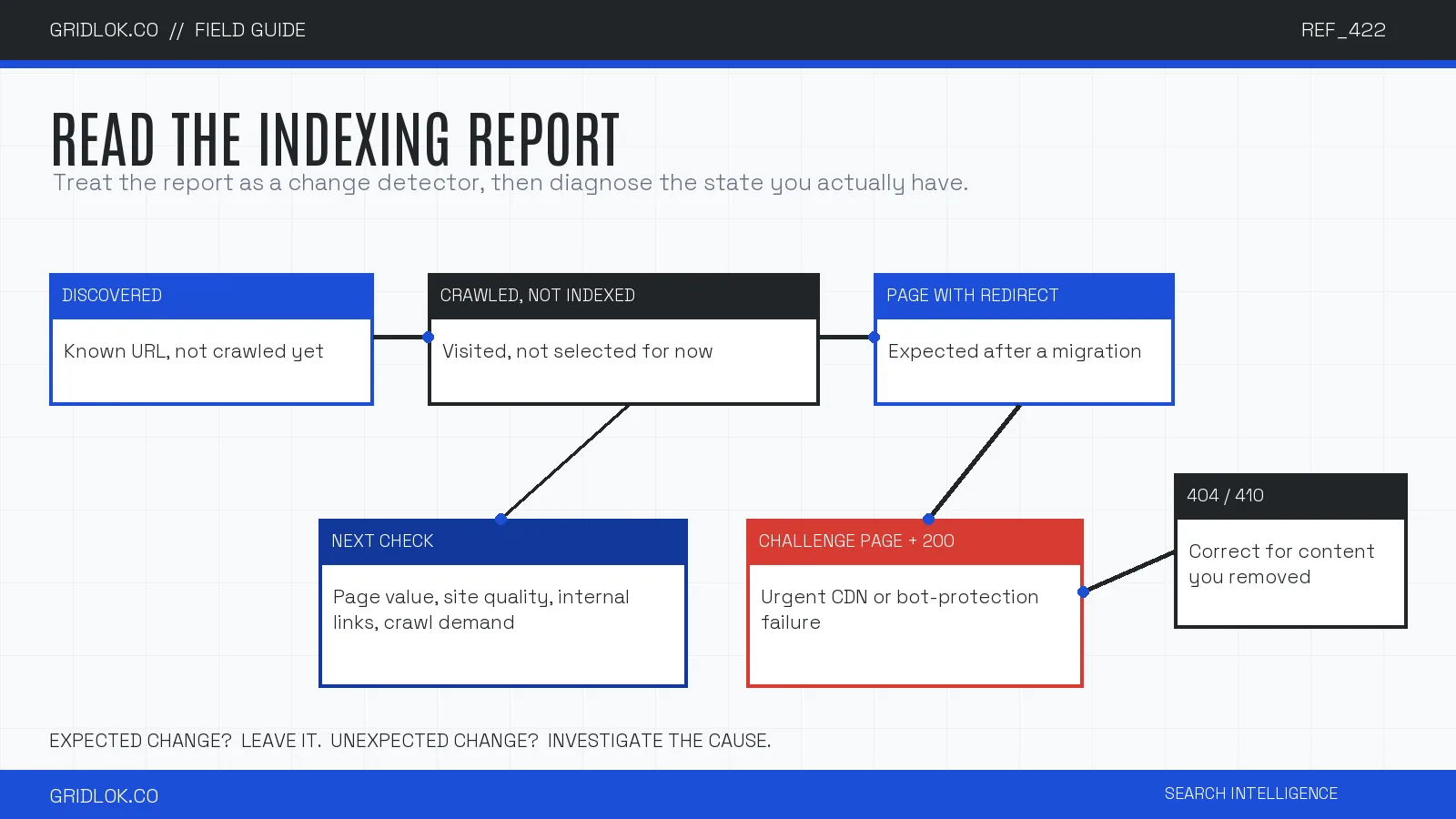
Crawled – currently not indexed means Google visited the page and decided not to index it, for now. That decision can have many causes, and only some of them are yours to change.
The uncomfortable one is quality. Mueller was direct about this: when their systems have serious concerns about a site overall, they crawl less and index less. The status is not a bug to patch. There is nothing to mark as fixed, because nothing technical is broken. What he suggested instead is stepping back and reading your site the way a stranger would, which is hard, since it is your baby and your baby is obviously the best one.
He also gave away what that stranger sees on a lot of AI-written sites: “Anyone could have written this. This tells me nothing.” I publish with AI in the workflow myself, so I take that as the bar to clear, not an insult. Generic output gets crawled and declined.
One more wrinkle worth sitting with: quality is the full page experience, not the text alone. Content buried under ad stacks, interstitials, and a two-thousand-word life story before the recipe reads as low quality even when the core information is fine, because that is what a visitor has to wade through.
What “discovered – currently not indexed” really means
Discovered – currently not indexed means Google knows the URL exists and has not visited it yet. No crawl, no verdict. New sites and new sections pass through this stage as a normal part of growing up, and watching pages move from discovered to crawled to indexed is a decent way to track how a young site is being absorbed.
The pattern to respect is a large, growing pile of discovered pages on an established site with no technical explanation. That points to the same quality conversation as above: Google is choosing how much of its time your site deserves, and right now the answer is not much.
| Status or signal | What it means | When it is expected | What to check |
|---|---|---|---|
| Discovered, currently not indexed | Google knows the URL but has not crawled it | New sites, new sections, crawl queues | Internal links, demand, server capacity |
| Crawled, currently not indexed | Google visited but did not select the page for now | Temporary processing or low-value pages | Page value, duplication, site-wide quality |
| Page with redirect | The URL redirects elsewhere | Migrations and deliberate consolidation | Destination, chain length, internal links |
| 404 or 410 | The resource is gone | Content removed on purpose | Whether the deletion was intentional |
| Challenge page returned as 200 | Bot protection served an error page as valid content | Never | CDN rules, status codes, canonical output |
Source: Google Search Console documentation and the Search Off the Record episode cited in the article.
There is no healthy index rate
People stare at the indexed versus non-indexed split and read it as a grade. Splitt was blunt: the ratio does not matter. He has seen healthy sites with a million non-indexed pages and half a million indexed, performing fine.
Then Mueller gave the number that should end this worry for good: Google’s own developer documentation property shows something like 5 percent of pages indexed. Noindexed old API versions, code samples, canonicals folding duplicates together. The pages that matter are indexed and earning impressions in the performance report, so the percentage is trivia.
If Google can run at 5 percent, your 60 percent is not the emergency it looks like. The only question is whether the pages you care about are the ones in the indexed pile.
A site: search is not an index checker
The site: operator is an artificial query, in Mueller’s description, and Search Console is the source of truth. Google sometimes hides indexed pages from site: results, and sometimes shows URLs that are not really indexed at all. After a clean domain migration, the old domain can keep appearing in site: searches for a year or three, which has convinced plenty of people their move failed when it worked perfectly.
My fyremedia mistake ran the same con in the other direction. The site: search showed nothing, which I read as deindexed, while Search Console was recording real impressions at real positions the same week. If I had shipped decisions based on the operator, I would have been optimizing a ghost.
So the working stack looks like this. For one URL, use the URL Inspection tool, which asks the index directly. For the site-wide picture, use the Page Indexing report and watch trends. For proof of life, use the performance report, because a page earning impressions is indexed by definition. The site: operator is for quick guesses, and it lies in both directions.
The bot-protection trap that quietly eats rankings
The scariest part of the episode was about hosting, not content. Aggressive bot protection at your CDN or host can start blocking Googlebot when crawling ramps up, and how it blocks decides how much damage you take.
The milder failure is wrong status codes: the protection layer returns 404, 410, or 403 under load instead of a 503 that says come back later. Pages start dropping for no visible reason, and the pattern shows up in the report as a sudden unexplained rise in errors across everything behind the CDN, not one misbehaving template.
The severe failure is the soft block. The protection layer serves an “are you a bot?” challenge page with a 200 status, so Google treats it as your real content. Your page’s actual content vanishes and gets replaced by the challenge screen in the index. It gets worse: since that challenge HTML is identical across many pages and many sites, Google’s deduplication can pick a canonical from someone else’s domain. Your product page, canonicalized to a stranger’s error screen. And you will never see it in a browser, because the interstitial only fires for bots.
The tell in the report is a wave of pages marked duplicate with a Google-chosen canonical pointing somewhere absurd. The fix lives with your CDN or host, not in your templates. And this is the one place “mark as fixed” genuinely earns its keep. Mueller explained the mechanics: Google recrawls a sample of the pages you flagged, and once the sample checks out, it speeds up the recrawl of the rest. It is a recrawl accelerator, not a confession button.
The report nobody sends you: AI crawlers
Everything above comes with a dashboard, an email alert, and a team at Google explaining it on a podcast. Now notice what happens when that same soft block fires on GPTBot, ClaudeBot, or PerplexityBot: nothing. No report, no error count, no notification. Your content just stops appearing in AI answers, and the assistants your customers ask start describing a challenge page or skipping you entirely.
There is no Search Console for AI crawlers. The monitoring Mueller wants you to do for Googlebot is the monitoring you have to hand-roll for AI: check what your CDN and bot rules do to AI user agents, sample your server logs for their visits, and watch whether AI tools can still cite your pages. The agentic SEO playbook covers that side, and the stakes only grow as the agents Google previewed at I/O start reading the web on people’s behalf.
My rule after the fyremedia episode: never trust a single artificial signal about how machines see your site. That goes for the site: operator, and it goes double for AI visibility, where the artificial signal is usually silence.
FAQ
The Page Indexing report stops being scary the moment you read it for changes instead of chores. Expected patterns confirm your work landed. Unexpected patterns tell you where to look. The rest is noise with a trend line.
And while Google hands you this much instrumentation for its own crawler, the AI crawlers reading your site get none. Checking what they can see and do on your pages takes two minutes with the Agentic Readiness Check.
See what ChatGPT is really searching
SubSeed captures the hidden Google queries ChatGPT runs behind every answer and enriches them with search volume, CPC, and keyword difficulty.
Related Posts


Read this post with an assistant
This is the whole prompt each button sends. Nothing hidden in it.
Read https://gridlok.co/blog/crawled-currently-not-indexed/ and give me the main points in a few sentences.
Make Gridlok a Preferred Source on Google
See Gridlok surfaced more often in your Top Stories, AI Overviews, and AI Mode. One click, applied across Google Search.