Google Crawling Infrastructure Explained: Googlebot Is Just One Client
Key Takeaways
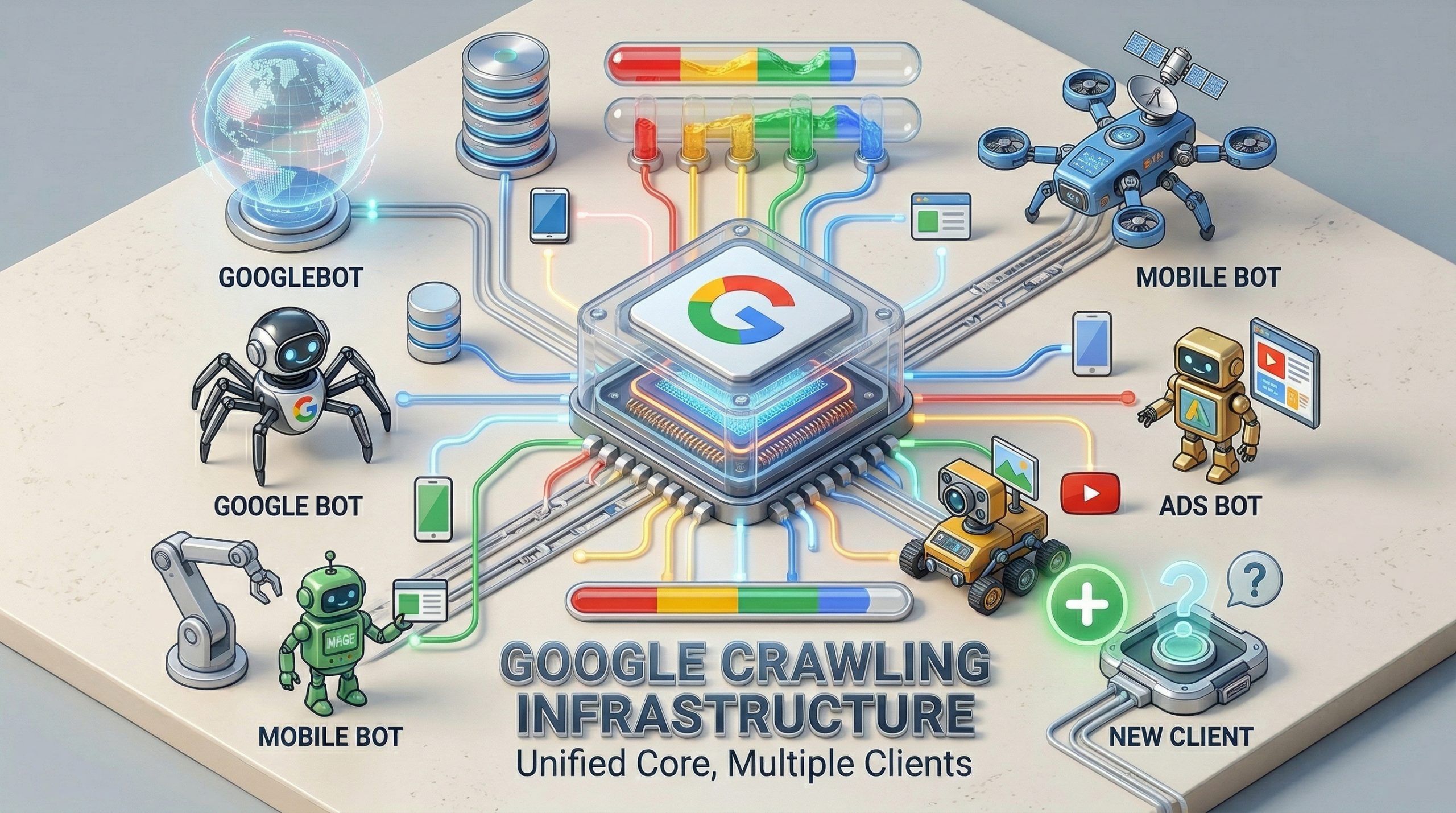
- Googlebot is not a standalone program. It is one client calling into a centralized, internal crawling platform that Google runs as software-as-a-service.
- Google operates dozens, possibly hundreds of crawlers internally. Only the major ones are publicly documented. Most SEOs have never seen the rest.
- The platform-level default file size limit is 15 MB, but Google Search overrides that to just 2 MB for HTML. Pages exceeding that threshold get truncated before indexing.
- Crawlers and fetchers are two different things. Crawlers run continuously in batch. Fetchers respond to a single URL on demand, with a human waiting on the other end.
Google’s Crawling Infrastructure Is Not What Most People Think
Google’s crawling infrastructure has been misunderstood for over two decades. In episode 105 of Search Off the Record, Google engineers Gary Illyes and Martin Splitt pulled back the curtain on how their crawling systems actually work.
The picture they painted is very different from the single-bot mental model most SEOs carry around.
There is no Googlebot.exe. There is no single program called Googlebot.
What exists is a centralized crawling platform, structured as internal software-as-a-service, that dozens of Google products call into through API endpoints. Googlebot is just one of those callers. A client name, not a system.
Why the Name “Googlebot” Is a Misnomer
Gary Illyes traced the naming problem back to the early 2000s. When Google had one product, it had one crawler, and calling it Googlebot made sense.
Then AdWords launched. Then more products. Each one needed to fetch from the web, so more crawlers spun up. But the Googlebot name stuck, and people started using it as a catch-all for the entire crawling operation.
“Googlebot is not our crawler infrastructure,” Illyes said on the podcast. “Our crawler infrastructure doesn’t have an external name. It has an internal name.”
He offered a placeholder: “Let’s call it Jack.” Jack is the SaaS platform. Googlebot is one of Jack’s clients.
Google News is another client. Google Shopping, AdSense, Gemini, NotebookLM, and an unknown number of internal teams all call into the same underlying system. Each one specifies its own configuration: user agent string, robots.txt product token, timeout thresholds, and file size limits.
The crawling platform handles the actual fetch, the throttling, the caching, and the “don’t break the internet” logic.
This distinction matters for anyone managing crawl behavior on their site. When you block Googlebot in robots.txt, you are blocking one client. You are not blocking Google’s entire crawling operation.
If you want to understand how Google AI Mode or other Google products access your content, you need to think about each crawler individually.
How the Crawling Platform Actually Works
The platform exposes API endpoints. A Google engineer or product team writes a program (typically C++, compiled into a binary), deploys it to a server in a data center, and makes API calls to the crawling service from there.
The calls specify what to fetch, how long to wait for bytes, what user agent to send, and which robots.txt directives to respect. Most parameters have defaults, so teams can omit them for simpler calls.
Illyes described the original version as “more or less just a wget that was running on some random engineer’s workstation” back in 1998 or 1999. The architecture has been rebuilt since then, but the core purpose never changed.
As he put it: “You tell it, fetch something from the internet without breaking the internet, and then it will do that if the restrictions on the site allow it.”
The response that comes back is the HTTP response, headers, body, and some additional metadata. For Google Search and AI Overviews, that means feeding it into the indexing pipeline. For other products, it could mean something completely different.
Crawlers vs. Fetchers: Two Different Modes
Illyes drew a clear line between crawlers and fetchers, and the distinction has practical implications for how your site gets hit with requests.
Crawlers operate in batch mode. They run continuously, processing a constant stream of URLs for a given team. No human is waiting for the result.
Fetchers work on a single-URL basis. You give a fetcher one URL, and it fetches that one URL. Someone on the other end is waiting for the response.
Think of it as a user clicking a button that triggers a server-side fetch. Illyes noted that fetchers use different IP ranges than crawlers, and internal policy requires fetchers to be “in some way, user controlled.”
The reason this matters: fetchers typically bypass robots.txt restrictions because a human explicitly initiated the request. If you’ve blocked Googlebot in robots.txt but someone shares your URL through a Google product that uses a fetcher, that content can still be accessed.
The official Google crawler documentation lists which user agents are crawlers and which are fetchers, but only the major ones make the cut.
Google Runs Hundreds of Crawlers You’ve Never Heard Of
Illyes was candid about the documentation gap. Google has “dozens, if not hundreds of different crawlers, or special crawlers, or fetchers” running internally.
Only the major ones get documented on developers.google.com/crawlers because, as he put it, the real estate on that page “is actually quite valuable” and listing every internal crawler on a single HTML page is “kind of infeasible.”
The threshold for documentation is volume-based. Illyes built internal SQL-like queries that trigger alerts when a crawler or fetcher passes a certain number of fetches per day. When that alert fires, the team gets an internal issue: “Hey, there is a new large crawler in town, and perhaps you want to document it.”
He also shared a story about a crawler that kept running two years after its project was shut down. The team insisted the crawler was “unlaunched,” but the logs showed it was still fetching.
Someone had forgotten to turn off a background job. That kind of thing is rarer now thanks to monitoring, but it highlights the scale of what’s running behind the scenes.
File Size Limits and How They Affect Your Pages
The crawling platform sets a default file size limit of 15 MB. Any crawler that doesn’t override this setting will stop receiving bytes after 15 megabytes.
For Google Search specifically, the limit is 2 MB for HTML. If your page’s HTML exceeds 2 megabytes, the crawler stops reading and works with what it has. The content below the cutoff point never enters the indexing pipeline.
Illyes suggested that for time-sensitive indexing, the limit could theoretically drop even lower, to 1 MB, because “if you need to push something through the indexing pipeline within seconds, then it’s easier to deal with little data.”
PDFs get more room at roughly 64 MB. Images presumably get their own thresholds too, since Martin Splitt pointed out that images easily exceed 2 MB.
If your landing pages carry heavy inline CSS, JavaScript, or bloated DOM structures, this 2 MB ceiling is worth checking against. Google’s patent on AI-generated landing pages suggests they’re already thinking about ways to bypass heavy pages entirely.
How Google Avoids Overwhelming Your Server
One of the reasons the centralized crawling platform exists is to prevent individual Google teams from accidentally DDoSing the internet. Illyes was direct: engineers cannot bypass the platform’s rate controls.
He gave a hypothetical: a new engineer joins Google, gets access to a data center machine with a 10-gigabit connection, writes a shell script, opens a socket, and starts streaming data from a website at full speed.
“I think that your server, or at least your hoster, is not going to like that,” he told Splitt.
The fix is architectural. Outbound requests from internal servers generally cannot egress directly to the internet. They have to route through the crawling platform’s API endpoints, which enforce rate limits, monitor response times, and throttle automatically.
When a site’s response time starts climbing on repeated fetches, the infrastructure slows down. A 503 HTTP response triggers a more aggressive slowdown, because it typically means the server is overwhelmed.
But 403 and 404 responses don’t trigger throttling. Those are treated as normal client errors and don’t signal server distress.
There’s also aggressive cross-product caching. If Google News fetched a page 10 seconds ago and web search wants the same page, the platform hands over the cached copy instead of hitting the server again. Some products have policies against reusing content fetched for other purposes (Illyes gave AdWords as an example), but the general principle is to avoid redundant fetches.
Geo-Blocking Is a Problem Google Can Barely Solve
Illyes called geo-blocking a “pet peeve.” Google’s standard egress IPs are assigned to the US, specifically Mountain View, California, in the 66.x.x.x range.
When a site geo-blocks US traffic, Google’s crawlers get a 403, a connection timeout, or a dropped connection with no response at all.
Google does have IP addresses assigned to other countries within their pools, and they can route crawl requests through those. But those egress points “were not designed for high capacity crawling.”
They can handle small-scale fetches for high-value content, like a page in Germany that answers a query with enough search volume to justify the effort. They cannot handle routine crawling for an entire country’s worth of geo-fenced content.
Illyes’s advice was blunt: “It’s a very, very, very bad idea to rely on this.”
If you geo-block and expect Google to find workaround IPs, you’re gambling on infrastructure that was never built for that purpose. For sites that serve different content by region, this is worth considering alongside your zero-click search strategy, since content Google can’t crawl can’t rank.
What This Means for Your SEO Strategy
Most of the SEO industry still talks about “Googlebot” as if it’s a single entity with uniform behavior. This podcast makes clear that it’s a label applied to one configuration of a much larger system.
A few concrete takeaways from the episode:
- Check your HTML page weight. If key landing pages exceed 2 MB of HTML, the bottom of your page may never get indexed. Run your templates through a size check and trim unnecessary inline styles, scripts, and DOM elements.
- Treat robots.txt as crawler-specific, not Google-wide. Blocking Googlebot blocks web search crawling. It does not block fetchers triggered by user actions, and it does not block other named crawlers with different product tokens.
- Don’t geo-block if you want Google to index your content. Their non-US crawling capacity is limited and reserved for high-value pages. If your content is region-locked and you want it in Google’s index, serve it to US-based IPs.
- Monitor your server response times under crawl load. The infrastructure automatically throttles when it detects slowdowns. If your server is consistently slow, you’re training Google’s crawlers to visit less often.
- Watch for undocumented crawlers in your server logs. Google runs hundreds of internal crawlers that may never appear in their public documentation. Cross-reference against the official crawler list and don’t panic if you see something unlisted.
- If you’re building content strategies around AI search growth, remember that AI products like Gemini and NotebookLM use the same crawling platform with their own configurations. Blocking one does not block the others.
Frequently Asked Questions
Is Googlebot a single program or application?
No. Googlebot is a client name used by the web search team when they make API calls to Google’s internal crawling platform.
The platform itself is a software-as-a-service system shared across many Google products. There is no Googlebot executable. Gary Illyes confirmed this directly: “Googlebot is not our crawler infrastructure.”
What is the file size limit for Google Search crawling?
The platform default is 15 MB, but Google Search overrides it to 2 MB for HTML content. PDFs are allowed roughly 64 MB.
If your HTML page exceeds 2 megabytes, the content below the cutoff is not indexed. Check your key landing pages against this threshold, or reach out if you want help auditing your page weight.
What is the difference between a Google crawler and a Google fetcher?
Crawlers run in continuous batch mode, processing streams of URLs with no human waiting for the response.
Fetchers handle a single URL at a time, triggered by a user action like clicking a button. Fetchers typically bypass robots.txt because a human explicitly requested the fetch. They also use different IP ranges than crawlers.
Does blocking Googlebot in robots.txt block all Google crawling?
No. Blocking Googlebot blocks the web search crawler. Other Google products use different crawler names and product tokens.
Fetchers triggered by user actions typically ignore robots.txt entirely. If you need to control access across multiple Google products, you need to specify each crawler individually. The Google crawlers documentation lists the major ones and their robots.txt tokens.
See what ChatGPT is really searching
SubSeed captures the hidden Google queries ChatGPT runs behind every answer and enriches them with search volume, CPC, and keyword difficulty.
Related Posts

Read this post with an assistant
This is the whole prompt each button sends. Nothing hidden in it.
Read https://gridlok.co/blog/google-crawling-infrastructure-explained-googlebot-is-just-one-client/ and give me the main points in a few sentences.
Make Gridlok a Preferred Source on Google
See Gridlok surfaced more often in your Top Stories, AI Overviews, and AI Mode. One click, applied across Google Search.