WebMCP: How to Let AI Agents Use Your Website

WebMCP is a new way for a website to hand AI agents a set of tools they can call directly, instead of leaving them to poke at your page and guess. It is early, it runs as a Chrome origin trial, and it points at where the agentic web is going.
I added it to this site, so this is both what WebMCP is and what it takes to wire it up.
Key takeaways
- WebMCP lets your site expose named tools (search, look up, submit) that an AI agent in the browser can call directly.
- It is the difference between an agent guessing from your HTML and an agent calling a function you defined.
- It runs through the browser. In Chrome it is currently an origin trial, switched on with a token in your page head.
- The API is small: register tools with a name, description, input schema, and a function, then the agent can list and call them.
- It’s early and it’s limited, and it’s the clearest look yet at how agents will use a website.
What is WebMCP?
WebMCP is a browser standard, still taking shape, that lets a website publish tools for AI agents. Instead of an agent reading your page and working out how to search or submit a form, your site says: here is a search tool, here is a contact tool, call them directly.
The name borrows from MCP, the Model Context Protocol that connects AI models to tools. WebMCP brings that idea to the open web, in the browser, so an agent visiting your page can use the tools you expose.
Why it matters
Today, an agent that wants to do something on your site has to reverse-engineer it: find the search box, guess the form fields, click the right button. It is brittle, and it breaks when your layout changes.
WebMCP replaces the guessing with a contract. You define a tool once, and the agent calls it the same way every time. For a business, that means an agent can reliably use your site, search your catalog, check availability, start an inquiry, instead of stumbling through a human-only interface.
It is the action layer of AI readiness. Structured data tells an agent what is true; WebMCP lets it do something about it.
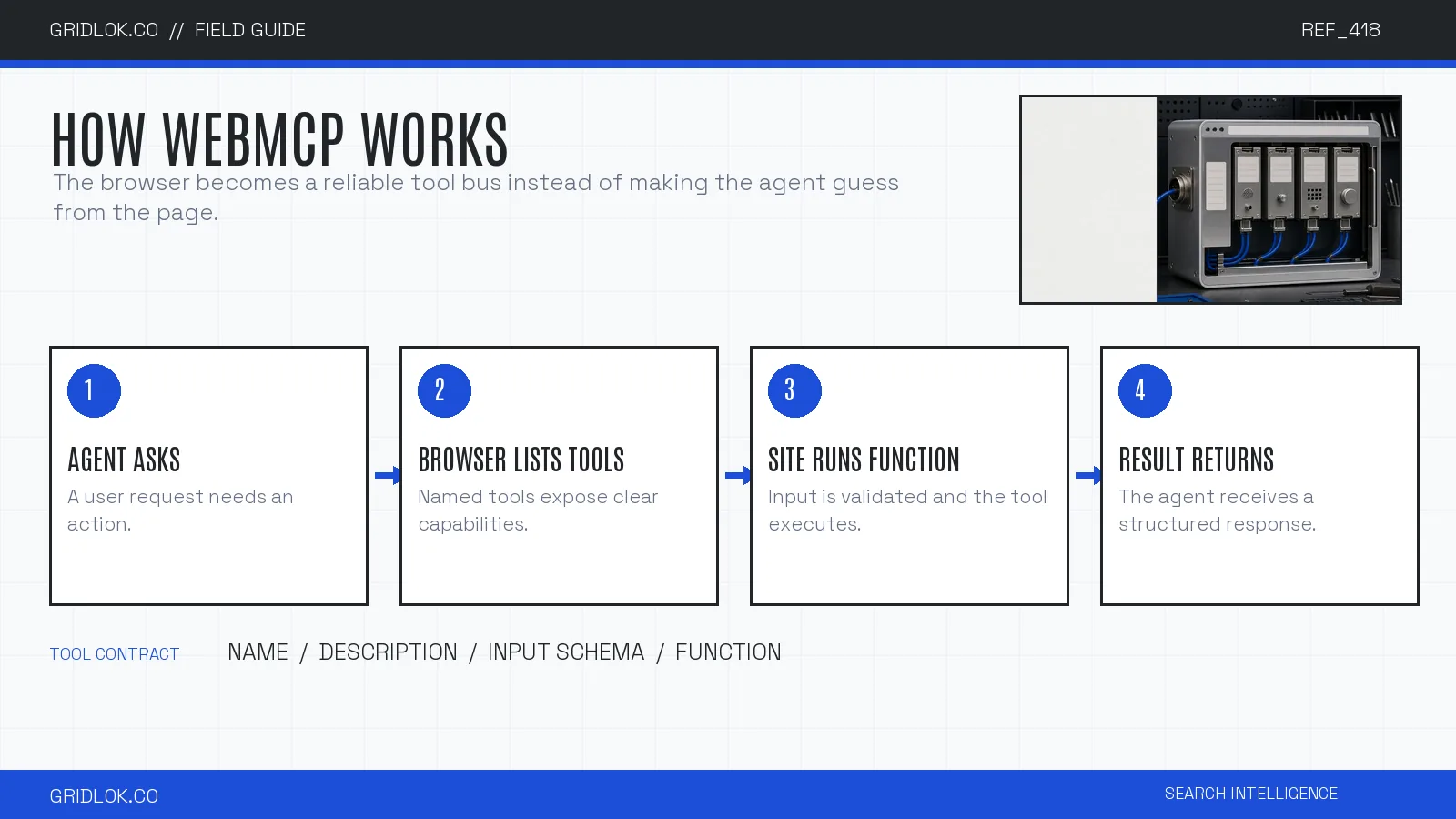
How WebMCP works
The mechanics are simpler than they sound.
In Chrome’s current origin trial, you add a token to your page head to turn the feature on. Then, in JavaScript, you register tools on the browser’s model-context interface. Each tool has a name, a short description, an input schema, and a function that runs when the agent calls it.
Once registered, an agent can list your tools and call them. On this site, I registered tools to search the articles, list the latest ones, and submit a contact inquiry. An agent in a supporting browser can call those directly.
The details are still moving. The exact interface and browser support change between Chrome versions, so treat any specific code as a snapshot. The shape, register tools and let agents call them, is the stable part.
| Part | Purpose | Good pattern | Risk to avoid |
|---|---|---|---|
| Name | Stable callable identifier | search_catalog | Vague or changing names |
| Description | Tells the agent when to use it | State scope and expected result | Marketing copy instead of behavior |
| Input schema | Defines accepted parameters | Required fields, types, limits | Unbounded free-form input |
| Function | Runs the website action | Validate, execute, return structured data | Hidden side effects |
| Permission boundary | Protects consequential actions | Read-only first, confirmation before writes | Silent submission or purchase |
Start with read-only search and lookup tools. Add actions that change data only after the permission boundary is explicit.
How to add WebMCP to your site
- Request a Chrome origin-trial token for the WebMCP feature for your domain, and add it as a meta tag in your page head.
- Decide which tools to expose. Start with read-only ones: search, look up, list. Save actions that change data for later.
- Register each tool in JavaScript with a clear name, description, input schema, and the function it runs.
- Test it in a supporting browser by listing and calling your tools, and confirm an agent gets what it needs.
Should you bother yet?
Updated 25 August 2026. Two changes since this published. OpenAI shipped WebMCP support in Codex, so Chrome isn’t the only agent that can use your tools now. The other change is that Chrome altered how these tools get called, so anything built before Chrome 153 needs updating by whoever wrote it. If you have WebMCP on your site already, that is a conversation with your developer this month.
Updated 11 September 2026. Chrome changed the calling side again. From Chrome 155, an agent hands a tool its input as a normal object instead of a chunk of text the tool had to unpack first. Text still works for now, so nothing breaks today. Tools that only sit on a site, like the ones in this site’s footer, don’t change at all. Anything that calls tools, such as an extension or a test script, is what needs the update. The spec change is public if your developer wants the detail.
Updated 28 September 2026. From Chrome 156, the notices a page gets when an agent starts using one of its tools, or cancels partway through, arrive in a different place. A site that reacts to them, say by showing that the assistant is checking stock, needs a small code change. Sites that only offer tools, like this one, aren’t affected. The spec change has the detail for your developer.
WebMCP is still early, the spec is still moving, and most of your traffic is still human. You don’t need it live this week.
It’s still the best look you’ll get at what an agent-ready site is: one that hands an agent a set of tools it can call. Two agents can do that now, so a small experiment costs an afternoon and tells you how your site reads to something that isn’t a person. See AI readiness: is your business ready for AI agents.
FAQ
WebMCP is a small spec with a big implication. Websites are starting to hand agents tools they can call, and the sites that do are the ones an agent can act on.
It is one layer of being ready for agents. To see how the rest of your site holds up, run the Agentic Readiness Check.
See what ChatGPT is really searching
SubSeed captures the hidden Google queries ChatGPT runs behind every answer and enriches them with search volume, CPC, and keyword difficulty.
Related Posts


Read this post with an assistant
This is the whole prompt each button sends. Nothing hidden in it.
Read https://gridlok.co/blog/webmcp/ and give me the main points in a few sentences.
Make Gridlok a Preferred Source on Google
See Gridlok surfaced more often in your Top Stories, AI Overviews, and AI Mode. One click, applied across Google Search.